



KIT can help you wherever you are!
KIT Remote Computer Support
Please contact a technical support representative at (248) 566-6461 before downloading and running our support software.
Windows PC Support: click here to download
Download Notes: click on the download link and follow the instructions below.
- Internet Explorer: Click Run and Run again once the file has finished downloading.


- Firefox: Click Save File, once the file has finished downloading double click on kitqs.exe in the download window , click ok if you get a security warning, and then RUN.

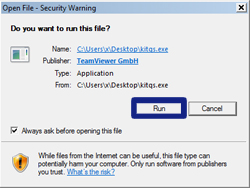
- Google Chrome: Click Save in the bottom left hand corner and then click on kitqs.exe


MAC Support: click here to download
Download Notes: click on the download link and follow the instructions below. - Safari: Once the file has finished downloading double click on TeamViewerQS
